


A3 Laminating Machine
Description
Technical Parameters
What is A3 Laminating Machine
Laminator Machine for A3/A4/45/A6:The dimensions of the laminator are 16.85 x 4.8 x 2.56 inches, it can laminate up to 13 inches wide (A3) with 2.5-4mil(60-100mic) pouches thickness. Maximum operating temperature is 293°F. Suitable for photos, cards, certificates, work permits, menus, drawings, etc.
Protection From Wear And Tear
Laminating machines offer several benefits for protecting and preserving important documents.One of the most significant benefits is that they create a durable, protective barrier that shields your documents from physical damage, water, dust, and other environmental factors that can cause wear and tear.The laminating process involves applying a thin plastic film onto the surface of the document, creating a strong and long-lasting seal that keeps the document safe from harm. This protective barrier can help extend the lifespan of the document, ensuring that it remains intact and legible for a long time.
Preservation Of Documents
A3 laminating machine are also ideal for preserving documents. Over time, paper-based materials can become discoloured or brittle. This is caused by exposure to light, air, and moisture. Laminating documents helps to prevent these changes from occurring, which means your documents will remain in pristine condition for much longer.
Easy To Clean
Laminating documents not only protects them from wear and tear, but it also makes them easy to clean and maintain. Unlike regular paper documents that can be easily damaged by moisture or cleaning products, laminated documents are more durable and can withstand cleaning with a damp cloth or mild cleaning solution.This feature is particularly useful for documents that are frequently used in dirty or dusty environments, such as construction sites or factories. Laminated documents like safety manuals, work orders, and other important instructions can accumulate dirt and grime quickly, making them difficult to read and potentially compromising their accuracy.
Professional Appearance
Laminating documents also gives them a professional appearance. A laminated document looks more impressive and is taken more seriously than a non-laminated document. This is particularly important for documents that are presented to clients or customers, such as business cards or brochures.
Versatility
A3 laminating machine are versatile and can be used for a wide range of materials. In addition to paper-based materials, they can also be used to laminate fabric, foam, and other materials. This means you can create a protective layer for a variety of items, such as badges, luggage tags, and even clothing.

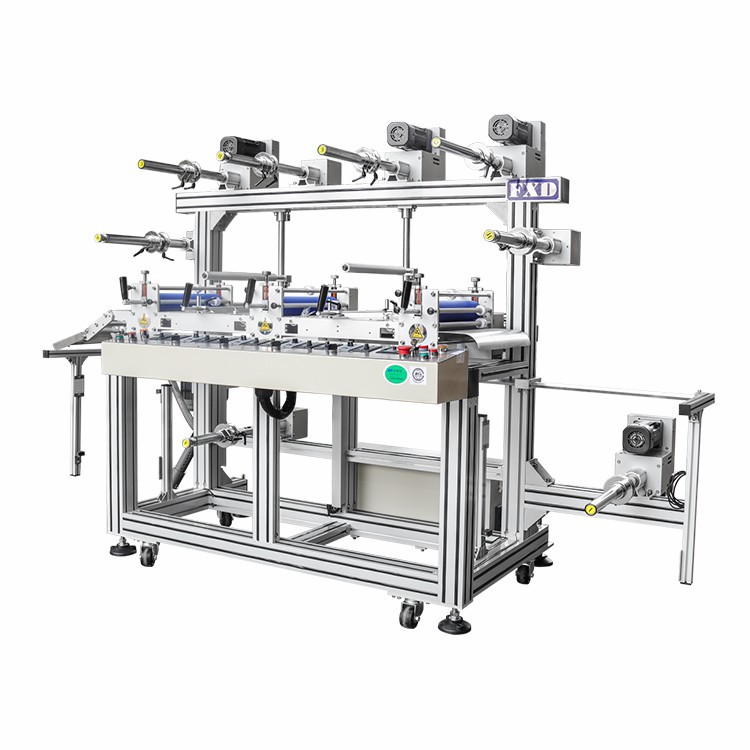
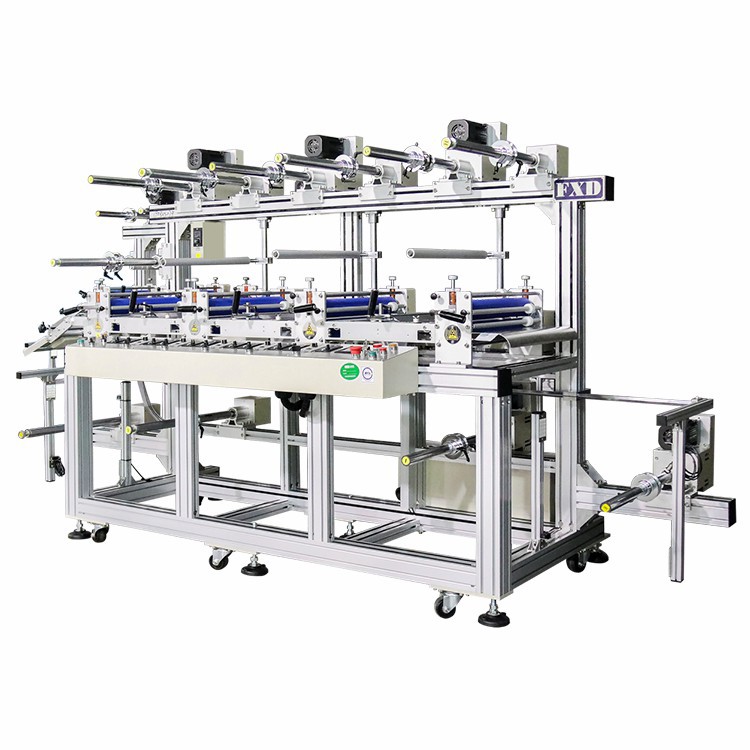

why choose us
Professional Team
We have 33 engineers and over 208 patents. Our quality and sales lead in China, and we have exported to over 10 countries.
Rich Experience
We are a high-tech enterprise with independent research and development, manufacturing, and marketing capabilities.
Online Service
Feixinda is guided by customer needs, providing flexible material processing equipment such as precision die-cutting and precision mounting.
One-stop Solution
We provide complete and comprehensive solutions for customers in industries such as 3C electronics, computers, tablets, screens, medical devices, automotive, and others.
Factors to Consider When Buying a A3 Laminating Machine
The document size will vary from machine to machine because they are suitable for specific document sizes. If a business is handling standard-size documents, then the pouch laminator may be a good option. A lamination pouch is also useful for fitting several items. On the other hand, roll laminators are the best choice for more flexibility on the laminated sizes. A3 laminating machine can laminate documents between 9 and 27 inches. Besides, these are automated laminators, which are suitable for standard-size documents, small items, and documents up to 11 x 17 inches.
A pouch laminator is perfect for small projects once or twice weekly. However, when laminating large quantities of large documents, businesses are advised to acquire a roll laminator. A roll laminator is also suitable for laminating documents with unusual shapes. Automatic laminators are ideal for large lamination jobs with standard-size documents.
Thick films will be more rigid, while thin films will be more flexible. The thickness of the film is measured in mils. Pouch laminators handle from 3 mils to 10 mils hence producing rigid lamination. When purchasing a pouch laminator, it is essential to note the film thickness it can handle. Roll laminators can process 1.5 mils, while automatic laminators work best with 3-5 mils films. Automatic laminators are the best when working on standard projects.
A3 laminating machine are suitable for single-person use and use by a group. Their settings feature enables switching from one user to the next much easier.On the other hand, pouch laminators are only suitable for use by a single person. They are small and are designed to fit on a desktop. Lastly, roll laminators can be used by a group. They are large and can be set up in a shared workspace for everyone to use them.
The cost of using a A3 laminating machine is split into 2, the cost of purchasing the machine and the film supplies. The price of a laminating machine varies primarily due to the technology and type of laminator. Acquiring these machines from verified dealers is better as a business may benefit from services such as free maintenance for some time or discounts.
A3 laminating machine are generally slow in operation. This is because they draw in the paper cautiously to prevent creasing and provide smooth lamination. The standard speed for laminators is 12 inches per minute. However, machines with a speed of 15 inches per minute are available if a business requires a faster laminator. Cold pouch laminators use pressure to activate the adhesive during lamination.
Types of A3 Laminating Machine




Pouch Laminators
These machines use laminating pouches which are available in various sizes and thicknesses. The document or item is placed inside the pouch which is then fed into the machine. The machine then seals and laminates the pouch, resulting in a protected and durable document.
Roll Laminators
These machines use rolls of laminating film which are fed through the machine. Roll laminators are available in different sizes and are suitable for laminating large items or documents.
Cold Laminators
These laminating machines do not require heat to seal and laminate the document. Cold laminators use adhesive material on the laminating film to stick it to the document. They are ideal for sensitive documents or items that may be affected by heat.
Hot Laminators
These machines use heat to seal and laminate documents. They are available in different sizes and are suitable for laminating photos, posters, and other large documents.
Industrial Laminators
These laminating machines are designed for heavy-duty use and are ideal for laminating large quantities of documents or items. Industrial laminators are available in different sizes and can accommodate materials of various thicknesses.
Application of A3 Laminating Machine
Office Use
A3 laminating machines are commonly used in offices for laminating important documents such as contracts, reports, and presentations. It helps to preserve documents for longer and protect against water, dust, and other elements.
Educational Use
An A3 laminating machine is an essential tool used in schools, colleges, and universities to laminate study materials such as posters, graphs, charts, and diagrams. Laminated materials are more durable and can be reused.
Creative Projects
A3 laminating machines are also used by artists, photographers, and graphic designers to protect and enhance the quality of their artwork by laminating them. Moreover, teachers can also use them in classrooms for creative projects such as bookmarks, flashcards, and holiday decorations.
Retail And Advertising
A3 laminating machines can also be used in retail and advertising industries to laminate price tags, shelf labels, product descriptions, and sales displays. Laminating these materials can make them more durable and attractive.
Designing Marketing Material
Brochures, flyers, and business cards can be laminated to give them a professional look and feel. Lamination protects these materials from ordinary wear and tear as well as moisture and dirt.
Packaging And Shipping
The laminated documents are resistant to environmental factors like moisture and dust, making them perfect for packaging and shipping.
Maintenance And Cleaning Of A3 Laminating Machine
Cleaning The Rollers : Cleaning The Rollers : ential part of A3 laminating machine and should be cleaned regularly to remove any adhesive residue, dirt, or debris. Use a soft cloth and a mild cleaning solution to clean the rollers gently. Avoid using harsh chemicals or abrasive materials, as they can damage the rollers.
Cleaning The Feed Tray : It is also important to check the feed tray for any stuck or jammed material before using the A3 laminating machine to prevent any damage to the machine. If you notice any buildup or damage to the feed tray, it may need to be replaced. Regular cleaning and maintenance of your laminator will not only ensure its longevity but also guarantee a high-quality output for all your laminating needs.
Checking The Temperature Settings : The A3 laminating machine works by applying heat to the materials to be laminated. It is important to check the temperature settings regularly to ensure that the machine is operating at the correct temperature. If the temperature is too low, the materials will not be laminated appropriately, and the materials can be damaged if the temperature is too high.
Checking The Pressure Settings : The pressure settings of the A3 laminating machine are also important. If the pressure is too low, the materials will not be properly laminated, and if the pressure is too high, the materials can be damaged. Check the pressure settings regularly and adjust them if necessary.
Using The Right Laminating Pouches : Using the right laminating pouches is essential for the proper functioning of the A3 laminating machine. The pouches should be compatible with the machine and the materials being laminated. Using the wrong pouches can damage the machine and the materials.
Lubricating The Machine : The A3 laminating machine has moving parts that require lubrication to ensure that they work smoothly. Use a lubricant recommended by the manufacturer to lubricate the moving parts regularly. Avoid using any other type of lubricant as it can damage the machine.
Checking For Wear And Tear : Check the A3 laminating machine regularly for any signs of wear and tear. Replace any worn or damaged parts immediately to ensure that the machine continues to work efficiently.
Types of A3 Laminating Machine
Single and double sided film laminators
With the advent of digital printing in the 1990's, sheet fed printing became more economical. Digital print is more economical than traditional Litho (or Lithographic) printing, as Litho involves a more costly production of plates made of metal or polyester.This meant that a print run of just one print job was now possible.
The Matrix Laminating, foil and Spot UV Systems are the best-selling SRA3/12×18 inch system in Europe. Litho Printers, Copy Shops, Digital Printers and Print Finishing Companies use them to laminate, foil and spot uv all kinds of print, including Business Cards, Wedding Stationery, High School & College Year Books, Brochures, Birthday Cards, Post Cards and Photo Books.
Wide format laminators
Sign Makers use wide format printers from manufacturers including Roland, Mimaki, HP, Epson and Canon. They can be used to print all sorts of large graphics, including posters, signage, roll-up banners and window graphics.
Many companies are now diversifying into more areas of wide and grand format, including pop-up displays, exhibition & trade show graphics and vehicle wraps for cars, motor bikes, buses & even planes!
These still prints need protecting however. Lamination provides protection so they become weather resistant from the rain and sun. A laminated print will also save the customer money, as materials can be re-used and valuable graphics are protected and signs & posters are stiffened.
The Easymount range of Wide Format laminating machines are available in cold, single hot and double hot options, with widths starting from 650mm/26 inches up to 2100mm/83 inches. They can laminate print as well as mount print to foam boards and lay down application tapes & vinyls.
Dual sided film A3 laminating machine
The best choice and most economical for printers and copy shops who supply their customers with short run prints. This is because these types of Thermal Film laminating machines can laminate single sided, as well as encapsulate. Single side lamination is popular for business cards, leaflets and flyers. Many restaurants will need their menu protecting so it can be used many times. Encapsulation is therefore a great option for many food outlets.
The Matrix Duo Laminating Machines will laminate litho and digital prints using OPP film. O.P.P. stands for Orientated PolyPropylene. It is sometimes referred to as BOPP (the "B" standing for "Biaxially").
Encapsulation film laminators
Often referred to as 'Encap', encapsulation using a film laminator has all the benefits that a pouch laminated print has, but is more flexible. Because the film has a much greater length than a pouch, longer items can be protected, for example long banners or posters.
Our Linea range of Encapsulation Laminating Machines are available from A3/11×17" to A0/34×44"size options. They're ideal for laminating maps and blueprints.
6 Common Issues With A3 Laminating Machine


The Film Isn't Sticking
This is particularly common with digital print, and it's because of the ink composition and the way inks bond to the adhesive. The denser the ink coverage, the harder it is to get the film to stick.
● Use the right film – Films react differently to different stocks, inks and machines because no film is universal. Start by choosing the right one for the print job (get advice on this!). Sometimes you might even need encapsulation film, check out my article about the differences between encapsulating and laminating.
● Turn the A3 laminating machine on early so it's full of heat – Often, printers turn the machine on right before they want to use it. When you start laminating from cold, you risk having different temperatures on parts of the roll, which affects the quality of the finishing. If you have cool spots on the product, it means there's an area on the roll that's not hot enough to melt the adhesive
● Make sure the ink is dry – Leave time for the print to cure before laminating. When you try to finish straight off the back of digital print, you're more likely to have issues with film sticking
There Are Bubbles Under The Film
Bubbling is generally a combination of many factors, so there's no single quick fix.
● Adjust the tension on the feed spool based on the film spec – If there's insufficient tension, air can get trapped between the film and the print. The correct tension depends on the film (the thicker the film, the more tension it needs), so check the specification
● Feed more slowly – You shouldn't feed the print into the machine faster than the laminator speed
● Make sure the ink is dry – This is the same as with the issue around film sticking. It's one of those instances where waiting saves time in the long run
● Ensure there's a consistent temperature – When you have hot spots on the rolls, the ink can boil. If bubbling is due to hot spots, make sure you're not leaving the machine idle for long (so roll temperature stays consistent), speed up the laminator and try reducing the temperature slightly.
The Print Ends Up With Orange Peel
If you're finding fine wrinkles or waves, it's usually because the A3 laminating machine is too hot.
If you laminating film is becoming wrinkled you may need to reduce the temperature
● Temperature – Use the recommended working temperature for the particular film
● Speed up the laminator – This is worth trying as a quick fix, because when you run the film faster it doesn't heat up as much
● Change the film – Sometimes you get orange peel when the prints have solvent residues, so use a film that's suited to this situation
The Print Won't Lie Flat After Encapsulating
A bit of print curl is normal but should resolve with gentle smoothing. If this doesn't work, try to:
● Adjust the laminator tension – If you use the same tension for the top and bottom films, the bottom will end up stretching more during laminating and then tightening more during cooling (which causes curling)
● Use the right film on both sides – Curling can happen when there's a heavy film on one side and a thin film on the other
There Are Marks On The Print
This is usually due to something stuck on the roll or a feeding issue causing the image to distort.
● Clean the rolls – Repeating marks are usually caused by adhesive, film or paper sticking to the roll
● Feed the print parallel to the roll – This helps prevent infeed waves
The Film Keeps Wrapping Around The Rear Rolls
This is a particular problem with lighter films, and it's because of the effects of static electricity. You can gently pull the wrapped film off the rear rolls by running the machine in reverse. To prevent the problem:
● Laminate in a continuous feed – The weight will help hold the film away from the rear rolls
● Leave a few inches of extra film between each sheet if encapsulating – This also adds weight, which mitigates the effects of static trying to pull the film back
● Ground your machine – Not only is this a safety issue, but it also helps drain off static from partial conductors
● Use tinsel – this is the most common way of neutralising static, but make sure you choose one with a metal core, stretch it tight, place it 0.25 inches from what you want to neutralise and give it free airspace
How Can I Avoid Laminator Film Wrap-up?
By allowing 2″-3″ of lamination film to hang out of the laminator as you start your lamination job and by making sure the back of the laminator is not up against a wall, cabinet or other obstruction, you should assure wrap-free operation.
Why Is My Lamination Turning Out Bubbly?
If you are using a thermal A3 laminating machine, then the heat setting may be too high for the item being laminated. If the machine has a control to adjust the heat, try lowering the temperature. Also, if using a thermal pouch laminator, make sure that you are using the correct carrier for the pouch.
What Causes Silvering?
Silvering is caused when the adhesive not "wetting out" properly, this problem is solved by either increasing the temperature setting or slowing down the speed setting. Sometimes you may need to do both. This will promote a better adhesive flow. The same principles apply to cold laminates. A temperature setting of 110F will help wet out the adhesive and accelerate the initial bond.
Why Is My Lamination Cloudy?
Cloudy lamination is usually the result of insufficient heat. If the machine has a control to adjust the heat, try increasing the temperature. You can also reduce the speed of the laminator, this will create longer dwell time on the heat shoes or rollers increasing the heat being transferred to the film.
Why Is Lamination So Important On Ink Jet Prints?
Many inkjet prints (up to 75% by some estimates) are laminated. In addition to adding rigidity and protection, lamination adds to the perceived value of the print. Different films change the look of the print – intensifying colors or adding satin, textured, or high-gloss finishes.
Lamination also extends the range of products that can be created from a single large format inkjet printer. For instance, without changing inks and media, you can use different finishing materials to produce floor graphics, presentation graphics, indoor signage, P-O-P displays, and tradeshow graphics. Although lamination adds to production time and requires skilled operators, many print-for-pay inkjet shops regard finishing as an important profit center.
How Long Will My Inkjet Image Last If I Protect It With A Uv Over-laminate?
Generally speaking, over-laminates with UV inhibitors will extend the life of your image by 3-4 times. Dye-based inks, when subjected to high levels of UV radiation, can fade in as little as a few days. This means that even with a protective over-laminate, your dye-based image can be damaged in as little as 2 weeks. Pigmented inks last significantly longer than dye-based. Laminated images printed with pigmented inks can expect at least a six to twelve month outdoor lifespan without experiencing significant UV fading.
Why Is Laminating Inkjet Prints So Tricky?
Many newcomers to large format inkjet printing find themselves reprinting jobs ruined when the laminating film peels away from the print (de-lamination). This is typically caused by the wrong choice of materials, or attempting to laminate inkjet prints that are not fully dry. Sometimes prints that feel dry to the touch but may not be adequately dry, due to the presence of glycol, an oily-type solvent used in nearly all water-based inks. Choosing the right film for you specific application is a key element in quality lamination. Spiral Binding sales specialists have the expertise to help you determine the right combination of products to use.
Why Won't My Thermal Film Stick To My Inkjet Output?
Providing the A3 laminating machine and speed settings are correct, the most likely culprit is your image. Inkjet prints that are not completely dry can be very difficult to laminate even with thermal films designed for inkjet print applications. Inks contain Glycol to prevent nozzle clogging. Glycol is an oily-type solvent that is not compatible with thermal adhesives.

About Us
Is a high-tech enterprise with independent research and development, independent manufacturing and independent marketing. Feixinda is guided by customer needs, providing customers with flexible material processing equipment such as precision die-cutting and precision mounting. With years of development, has served 5000+ customers and obtained 200+ invention patents, Feixinda is committed to becoming an international leading intelligent equipment provider, creating a century-old enterprise with employee happiness, customer trust and social respect.
Team Introduced
The special team is divided by the core personnel of each project, which is a mature technology, efficient and innovative R&D team with higher education background and many years of practical experience.
Strictly grasp the direction of product research and development, broaden the original die-cutting equipment field across downstream manufacturers' steps, and provide complete and comprehensive solutions for customers in 3C electronics, computers, tablets, screens, medical, automotive and other industries.


Company Certificate


Asked Questions
Hot Tags: a3 laminating machine, China a3 laminating machine manufacturers, suppliers, factory, office laminator, laminating for dating, laminating for filing, laminating for clustering, laminating for look, laminating for researching
|
Name |
unit |
a3 laminating machine |
|
Maximum bonding area |
mm |
450 |
|
Maximum operating speed |
m/min |
30 |
|
Dimensions |
mm |
2000(L)*1140(W)*1700(H) |
|
Machine net weight |
kg |
380 |
|
Total power |
kw |
AC220V 1.2KW |
Previous
Laminator A4Next
Laminating MachineSend Inquiry
You Might Also Like


